Your Guide to Getting Started at Ganemo
You're One Step Away from Starting at Ganemo
You are here because you received our "Job offer" email with the form "Configure your salary package". That means you are already part of Ganemo and can start working once you complete the form and sign your contract
It is very important that you complete the form correctly, since it will automatically generate your contract, so on this page we will help you with the following:
- We will give you the tax identification details of the company that hired you.
- We provide the forms you must download, complete, and sign so you can attach them to the "Contract proposal" form.
- We will answer your main questions.

All the Information and Forms You Need
In the "Configure your salary package" form, we ask you to provide a bank account in your name. If you do not have a "Payroll" type bank account, you can open a new payroll account at BCP.
To do this, simply visit any BCP branch in person with your DNI (national ID) and the RUC (tax ID number) of the company hiring you, and say that you want to open a payroll account.
The bank will ask for the company's RUC number, so be careful to provide one of the following RUCs, depending on which company is hiring you:
- Legal name: Pasturia SAC, RUC No. 20611117427
- Legal name: Ganemo SAC, RUC No. 20551583041
What if I don't know which company is hiring me?
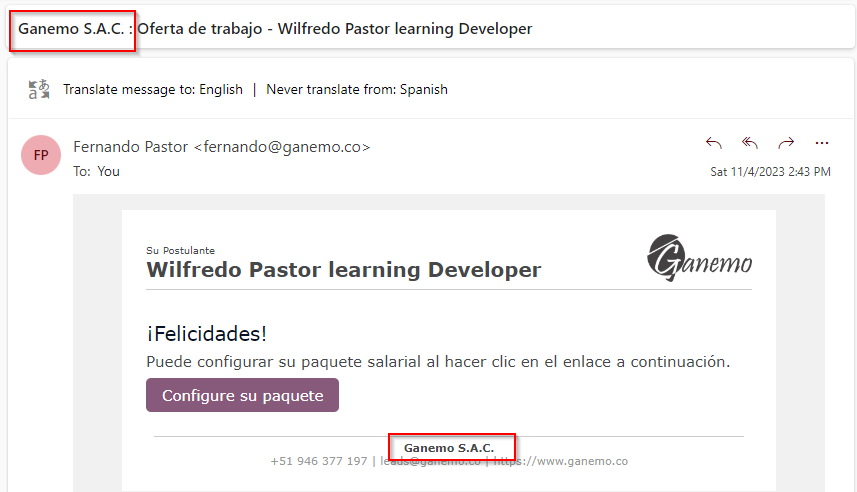
It is easy to tell which company sent you the proposal, because in the "Job Offer" email the company name appears in the "Subject" line and in the email "Footer", as shown in the following image:

You can access the following legal benefits if you send us the DNI of your dependents:
- Peruvian health insurance for your minor children, or for your adult children with total and permanent incapacity to work.
- Health insurance for your spouse or live-in partner
- Additional income as a "family allowance" if you meet any of the following conditions:
- You have minor children
- You have children under 25 who are actively pursuing higher education.
We want to make sure that you and your dependents enjoy these legal benefits and have no problems when using your health insurance. That is why, in the section of the "Configure your salary package" form that asks for the "ID Document for Children and/or Spouse", you should attach everything listed below in a single PDF file:

- DNI of your minor children (both sides)
- DNI of your adult children under 25 (both sides) who are actively pursuing higher education.
- Certificate or enrollment record proving they are pursuing higher education.
- DNI of your adult children with total or permanent incapacity to work.
- Legible disability certification issued by a medical board.
- DNI of your spouse (both sides)
- Copy of the civil marriage certificate, issued no more than 3 months ago.
- DNI of your live-in partner (both sides)
- Document recognizing the de facto union by court ruling or public deed
Important:
This field is NOT mandatory, so you can continue with signing your contract without completing it, and after you have started working you can provide this information to HR. But remember that you will not receive these legal benefits until you submit all the information, and the benefits are NOT retroactive; they only apply from the moment you submit all the supporting documentation.
It is very important to make sure your pension is paid correctly, so you must download, complete, and sign the following pension sworn statement form. Take the time to read it carefully and complete it diligently.
Download the Pension System Sworn Statement (DDJJ) form: Download

You will have mandatory life insurance, so you must download and complete the following form, naming your beneficiaries. The signature on this sworn statement must be notarized.
Download the Vida Ley (life insurance) sworn statement form: Download
Then you must upload it in the "Configure your salary package" form that we sent to your email.
Frequently Asked Questions
You can now return to your "Configure your salary package" form. If you lost the link or the window was closed, you can get back in from the email you received with the "Job offer", as shown in the following image: